Characters — the call-centre cast
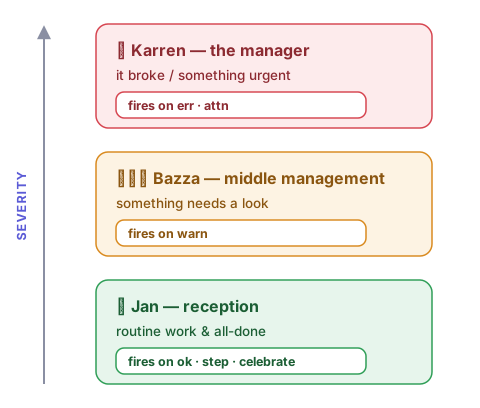
When your coding agent wants your attention, you'll hear from Jan, Bazza or Karren — depending on the severity. Be warned: if Karren picks up the call, you know something's gone wrong. She'll be wanting to speak to a manager. That's you.
It's a three-tier escalation ladder — like a support line where the problem keeps getting bumped up the chain. Each character has its own voice (zero-shot cloned from a reference sample), a phrase bank, and dials you can tune live.
The dials
Each character has an intensity dial and (for Jan and Bazza) a competence dial — 1 = useless, 10 = sharp:
Jan — reception (default). ockerism 1 (professional) → 10 (broad bogan) → 11 (swearing); competence 1 (mangles everything, trails off) → 10 (clean relay).
"Beauty, all sorted." / "Er, in-fur-france needs help, or whatever…"
Bazza — middle management. stress 1 (apathetic) → 10 (anxious, talking fast); plus the same competence scale.
"Yeah, might wanna look at that when you get a sec."
Karren — the manager. A single karren scale: 1 (curt) → 5 (rude) → 10 (full-Karen meltdown, demanding your manager — i.e. you).
"Oh, Jan. Jan. Keep calm, count to ten… NOT — HAPPY — JAN!"
Tune any of them live, without restarting — just ask Claude ("make Jan more bogan", "set Jan's competence to 3"), or use the CLI:
nhj set jan.ockerism 11    # full swearing bogan (swears bleeped — see dynamic-voices.md)
nhj set jan.competence 3   # muddled — mangles the message
nhj set bazza.stress 9     # frantic middle-manager
nhj set karren.karren 10   # full meltdown
nhj status                 # show current dials
The swearing/bleep behaviour at ockerism 11 is covered in Dynamic voices.
Adding a voice character
voices/
  myvoice/
    ref.wav        # 5-10s clean audio sample (no reverb)
    ref.txt        # verbatim transcript of ref.wav
    character.yaml # name, model_tier, preamble, phrases
Add your own characters by dropping a ref.wav, ref.txt, and character.yaml into voices/<name>/. Each character is a standalone voice with its own reference clip. See voices/jan/character.yaml for a full example.