Configuration & requirements
Edit .env — all settings are documented there. For the full audio control surface (ducking, modes, hold sounds, scenes, filters) see Audio Standard & Pipeline; for the dynamic-LLM settings see Dynamic voices.
Config file (config.yaml) overrides
NHJ ships its defaults in a read-only default.yaml (bundled inside the wheel; config/default.yaml in a source checkout). To change routing, modes, adapter order, intents, or device settings, create your own config.yaml — you never edit the shipped defaults.
Where it goes (loaded lowest → highest precedence, later wins):
- the shipped
default.yaml config.yamlbesidedefault.yaml— source-checkout convenience (config/config.yaml)~/.config/nhj/config.yaml— the supported location for installed/packaged use ($XDG_CONFIG_HOME/nhj)$NHJ_CONFIG_FILE— an explicit path, highest precedence
Merge semantics: nested mappings merge key-by-key (so you override just the keys you care about — everything else keeps its default); lists and scalars replace wholesale.
# ~/.config/nhj/config.yaml — override only what you need
routing:
  rung_by_intent:
    warn: karren        # send warnings to Karren (other intents keep their defaults)
adapters: [haptic, audio]   # a list → replaces the default adapter order entirely
Precedence vs env vars: for settings that also read an environment variable — NHJ_DEFAULT_CHARACTER, NHJ_ERROR_CHARACTER, NHJ_<NAME>_LEVEL / _CHAOS, and the audio/device NHJ_* vars — the env var wins over config.yaml. Everything else comes from the merged YAML.
A missing config.yaml is normal. A config.yaml that exists but is malformed (invalid YAML, or a top level that isn't a mapping) fails loudly with the offending path — it is never silently ignored. Fix or remove the file.
.env essentials
# Choose TTS backend
TTS_ENGINE=qwen          # local Qwen3-TTS (Apple Silicon, default)
# TTS_ENGINE=none        # run without voice

# Choose default character
NHJ_DEFAULT_CHARACTER=jan
# NHJ_ERROR_CHARACTER=karren  # Karren auto-routes on errors by default

# Enable devices
LAMETRIC_DEVICE_IP=192.168.1.xx
LAMETRIC_API_KEY=your-key

DIVOOM_DEVICE_IP=192.168.1.xx
DIVOOM_DEVICE_TYPE=TimesGate

ESP32_BELL_URL=http://192.168.1.xx/bell
ESP32_BELL_INTENTS=err,attn

# AWTRIX 3 / Ulanzi pixel displays — easy path (no broker): full setup in docs
ULANZI_TRANSPORT=http
ULANZI_HTTP_HOSTS=awtrix_96895c.local       # mDNS name; one display or many
# Extensible path (many displays / Home Assistant / cross-VLAN): use MQTT instead —
# ULANZI_TRANSPORT=mqtt ; ULANZI_MQTT_HOST=mqtt.lan ; ULANZI_MQTT_PREFIXES=awtrix1,awtrix2
# (or configure the `awtrix:` block in ../config/default.yaml — brightness, text_style, dynamic_text)
AWTRIX displays: a ~$60 Ulanzi TC001, running in ~10 minutes — flash it, join Wi-Fi, point NHJ at its
awtrix_<chipid>.localname over HTTP. Each[vibes:…]then shows a random icon from the intent's pool, a per-intent treatment (colour / effect / blink,attnholds), and an in-character headline (LLM-compressed whenNHJ_DYNAMICis on, else a curated ocker/plain phrase). Add an MQTT broker later for many displays, Home Assistant, or cross-network reach. Full guide: awtrix-display-setup.md.
Inference muzak
Muzak for while the agent's thinking — Jan's idea of putting you "on hold." Off by default. Turn it on and it plays while the agent works, pausing the instant a character speaks, then resuming when you reply:
nhj muzak on        # enable the call-centre experience
nhj muzak off       # back to silence
nhj muzak status    # playing / paused / stopped
It's driven by Claude Code's lifecycle hooks: muzak starts/resumes on UserPromptSubmit (inference begins), pauses on Stop (a character picks up), and stops on SessionEnd. Pause/resume is exact — the track freezes and continues from the same sample.
The bundled 4+ hours of hold music (and the SFX / voice clips / ambient beds) install via nhj setup-media, which pulls the audio/ and voices/ bundles from the media GitHub release — re-run it anytime to refresh, or set NHJ_MEDIA_BASE to host the bundles elsewhere.
The release assets are public, so
nhj setup-mediadownloads them directly — noghor authentication needed. (If you fork into a private repo, or otherwise gate the release,setup-mediaautomatically falls back togh release downloadwhen the plain URL returns 401/403/404.)
Drop your own tracks (.m4a, .mp3, .wav…) into audio/music/, or point NHJ_MUZAK_DIR at a folder; they shuffle-cycle. Set the level with NHJ_MUZAK_VOLUME (0–1, default 0.5).
TTS backends
Measured on an Apple M2 Ultra, mlx-audio 0.4.3 (warm daemon, ref_text supplied):
| Backend | Setup | RAM | Disk | Quality | Speed (warm) |
|---|---|---|---|---|---|
| Qwen3-TTS 0.6B-8bit (local, default) | Apple Silicon | ~2.2 GB | ~1.9 GB | Good | ~0.45× RTF (≈2× realtime) |
| Qwen3-TTS 1.7B-4bit (local) | Apple Silicon | ~2.5 GB | ~2.2 GB | Better | ~0.50× RTF |
The voice is fully local and self-contained — no cloud TTS, no API keys.
A typical notification (2–4 s of speech) synthesises in ~1–2 s on a warm model. The first
call after start-up is slower (MLX graph compile) — which is why the TTS server is a persistent
daemon that keeps the model loaded. Common phrases are pre-rendered (nhj build-bank) and play
instantly; only novel messages hit the model.
By default on macOS, model artifacts live under ~/Library/Caches/not-happy-jan/:
| Model | Default location | Runtime caller |
|---|---|---|
| Qwen3-TTS voice model | ~/Library/Caches/not-happy-jan/tts-models/ (HF_HOME for the TTS server; Hugging Face stores snapshots below it) |
nhj install-tts loads the com.guruswami.nhj-tts LaunchAgent, which runs python -m nhj.tts_server on 127.0.0.1:9992; audio events call NHJ_TTS_URL (/tts/generate). |
ocker-bogan-nano dynamic LLM |
~/Library/Caches/not-happy-jan/ocker-bogan-nano/ocker-bogan-nano-Q4_K_M.gguf |
nhj install-model loads the com.guruswami.nhj-ocker-bogan-nano LaunchAgent, which runs llama-server -m <that .gguf> on 127.0.0.1:9991; dynamic voices call NHJ_DYNAMIC_BASE_URL (/v1/chat/completions). |
Set NHJ_CACHE_DIR to move both NHJ-managed model caches. Set HF_HOME/HF_HUB_CACHE if you
want the TTS server to use an existing Hugging Face cache, or NHJ_TTS_MODEL to point Qwen3-TTS
at a specific repo id or local model path. Set NHJ_DYNAMIC_* to use a different LLM endpoint.
Note: always run the local path via the warm
nhj start-serverdaemon and supply each voice'sref.txt. Calling Qwen3-TTS without a reference transcript makes it load whisper-large-v3-turbo to transcribe the clip — an extra ~1.5 GB of RAM and latency. NHJ's server path avoids this by usingvoices/<name>/ref.txt.
Where NHJ stores things (macOS)
Everything lives under your home folder — no sudo, and nhj uninstall removes all of it.
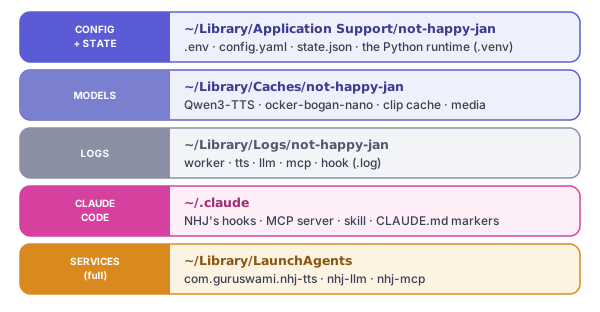
Override any root with NHJ_CONFIG_DIR / NHJ_CACHE_DIR / NHJ_STATE_DIR / NHJ_LOG_DIR / NHJ_DATA_DIR.
Requirements & minimum specs
For the three ways to run NHJ — silent, pre-recorded samples, or the full live experience — and the RAM/disk each needs, see Minimum specs.
| Tier | What you need | Notes |
|---|---|---|
| Required (core) | macOS Apple Silicon (M1+) · Python 3.10+ · ~8 GB RAM (16 GB recommended) · ~5 GB disk | The Qwen3-TTS voice needs ~2.2 GB resident. TTS_ENGINE=none runs it text-only (no voice). |
| Recommended (everything local) | + ocker-bogan-nano dynamic voice brain | ~940 MB download, +~0.5 GB RAM. Everything stays on-device — the complete ocker-bogan experience, no cloud. |
| Optional | Hardware feedback — LaMetric · Ulanzi/AWTRIX · Divoom · ESP32 bell · haptic mouse | Visual/physical alerts beyond audio. Deferred/experimental in v1; set device IPs in .env. |
Local TTS is the only heavy component — everything else (hook, MCP, queue, mixer) is lightweight Python. NHJ v1 is self-contained and macOS-only — nothing phones home.
| You want… | Need | RAM | Disk |
|---|---|---|---|
| Local Qwen voice (offline, default) | Apple Silicon Mac (M1+) | 8 GB works · 16 GB recommended | ~5 GB free |
| Silent (text/markers only) | Apple Silicon Mac | minimal | minimal |
Set TTS_ENGINE=none in .env to run without voice. Everything is local — no cloud, no API keys.