Install profiles — default · full · minimal
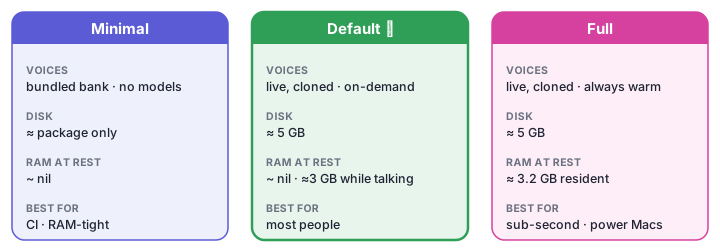
NHJ ships with three install profiles so a single command works on any machine — from a powerful Mac Studio to a RAM-tight laptop in a CI environment.
curl -fsSL https://raw.githubusercontent.com/guruswami-ai/not-happy-jan/main/install.sh | bash

# Or from a checkout:
bash install.sh             # default — full experience, on-demand model loading
bash install.sh --full      # persistent TTS + MCP and warm model servers (macOS LaunchAgents)
bash install.sh --minimal   # hooks + MCP + bundled voice bank; no model downloads
The one-line command downloads the source archive, installs uv plus a managed
Python runtime when needed, and uses the default profile. All three profiles
are non-interactive. Set NHJ_NO_BOOTSTRAP=1 to require a preinstalled uv
instead of allowing the official uv bootstrap.
Default profile
The default install gives you the full NHJ experience without permanently pinning RAM:
| What's installed | Notes |
|---|---|
| Python runtime + package | ~/Library/Application Support/not-happy-jan/runtime/.venv on macOS; nhj linked into ~/.local/bin |
.env config |
copied from .env.example on first run |
| Qwen3-TTS model download | ~1.9 GB, cached locally for on-demand loading |
ocker-bogan-nano LLM |
~940 MB GGUF via nhj install-model — needs llama.cpp; noted as a follow-up if absent |
| Bundled media | ~250 MB voices + hold music from the release |
| Bundled voice bank | ships inside the package — the cast speaks pre-recorded lines even before any model loads |
| Claude Code hooks | Stop · UserPromptSubmit · SessionEnd |
| Claude marker block | written to ~/.claude/CLAUDE.md so Claude emits the [Jan:ok\|…] markers the Stop hook speaks |
| MCP server (stdio) | registered in ~/.claude/settings.json; spawned per session |
The TTS voice model is downloaded once but not loaded into a persistent daemon — the server starts when the first vibe fires and the process exits when idle. This is the right trade-off for most developer laptops: full voices, zero always-on RAM cost, sub-second latency on a warm MLX cache.
The MCP server uses stdio transport (spawned locally by Claude Code per session). It is bound to your machine and is not reachable over the network.
--full — persistent services
--full adds persistent LaunchAgent services (macOS only) on top of everything the default installs:
| What's added | Notes |
|---|---|
| TTS LaunchAgent | NHJ TTS (nhj.tts_server) on 127.0.0.1:9992, starts on login + KeepAlive |
| LLM LaunchAgent | NHJ LLM (ocker-bogan-nano via llama.cpp) on 127.0.0.1:9991, starts on login + KeepAlive |
| MCP LaunchAgent | NHJ MCP (nhj.mcp_server) streamable HTTP on 127.0.0.1:8765, starts on login + KeepAlive |
| Warm model servers | nhj servers persistent — daemons kept warm so replies are instant (no cold start) |
Claude Code remains registered with the local stdio MCP transport. The persistent HTTP endpoint is an additional service for callers that deliberately use it.
All services bind to 127.0.0.1 by default. LAN or network exposure is a deliberate opt-in:
This is the right profile for a Mac Studio or dedicated workstation where you want sub-second responses with no cold-start, or for a multi-seat setup where a single NHJ instance serves several Claude Code sessions over the local network.
The TTS model, the ocker-bogan-nano LLM, and the media are all installed by the
default profile already — --full just keeps their daemons warm instead of
loading them on demand.
--minimal — hooks + bundled voice bank
--minimal skips all model downloads and persistent services:
| What's installed | Notes |
|---|---|
| Python runtime + package | platform user-data runtime; nhj linked into ~/.local/bin |
.env config |
copied from .env.example on first run (with TTS_ENGINE=none) |
| Bundled voice bank | ships inside the package — the cast speaks pre-recorded lines |
| Claude Code hooks | Stop · UserPromptSubmit · SessionEnd |
| Claude marker block | written to ~/.claude/CLAUDE.md |
| MCP server (stdio) | registered in ~/.claude/settings.json |
No models are downloaded. No media is fetched. NHJ runs with TTS_ENGINE=none (set in .env) — but it is not silent: the bundled voice bank ships in the package, so Jan, Bazza and Karren still speak pre-recorded in-character lines for each feedback state, and the hooks, [vibes:] markers, and any hardware adapters (haptic, pixel displays) all fire. TTS_ENGINE=none disables only live synthesis — to get freshly-generated lines and the dynamic bogan brain, use the default install. (Run nhj mute for true silence.)
This is the right profile for:
- Low-RAM machines (8 GB or less) — avoid the 2.2 GB TTS model entirely, still hear the cast
- CI / automation — deterministic, reproducible, fast
- Remote Linux servers — the bundled bank plays via the cross-platform mixer; live MLX TTS doesn't apply
- Trial installs — get hooks, markers, and a talking cast wired before committing disk
Upgrade later without reinstalling:
bash install.sh          # upgrades minimal → default (adds TTS + LLM + media, live voices)
bash install.sh --full   # upgrades to persistent services
MCP server — localhost by default, explicit opt-in for network
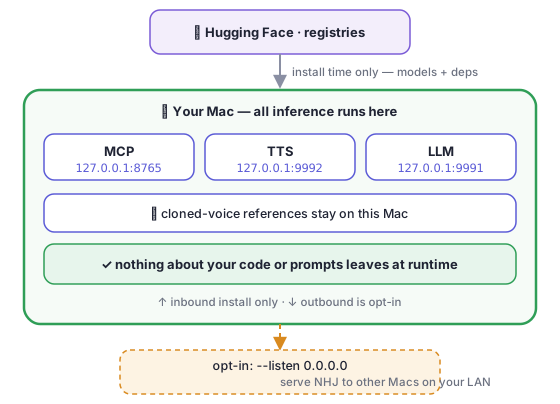
The MCP server always defaults to 127.0.0.1 regardless of profile. Network exposure requires an explicit flag in two places:
- The
--listenflag toinstall.sh(or directly tonhj install-mcp) - Setting
NHJ_HOST=0.0.0.0if running the server manually
# Default: local only
nhj install-mcp                                      # stdio (per-session, local)
nhj install-mcp --transport streamable-http          # HTTP on 127.0.0.1:8765

# Explicit network exposure:
nhj install-mcp --transport streamable-http --listen 0.0.0.0
Local character services — the "ocker Aussie" scenario
NHJ is designed to host custom local character services. The default characters (Jan, Bazza, Karren) run against the shared Qwen3-TTS daemon. You can add your own ocker Aussie character and wire it to the same local service:
voices/
  my-ocker/
    ref.wav         # 5-10s of clean reference audio (no reverb)
    ref.txt         # verbatim transcript of ref.wav
    character.yaml  # name, model_tier, preamble, phrases
nhj build-bank --voice my-ocker    # pre-render phrase bank (optional, fast playback)
nhj test ok                        # hear your new character
The TTS service runs entirely on-device — the reference audio never leaves your machine. You can tune the voice in real time:
nhj set my-ocker.ockerism 9        # dial up the bogan
nhj set my-ocker.competence 4      # mangle the message convincingly
See Characters & dials for the full character authoring guide.
Comparison table
| Default | --full |
--minimal |
|
|---|---|---|---|
| Python venv + hooks + markers | ✓ | ✓ | ✓ |
| Bundled voice bank (cast speaks) | ✓ | ✓ | ✓ |
| MCP server registered | ✓ stdio | ✓ stdio + HTTP | ✓ stdio |
| Qwen3-TTS model | downloaded | downloaded | — |
ocker-bogan-nano LLM |
downloaded | downloaded | — |
| Bundled media (hold music) | downloaded | downloaded | — |
| Persistent TTS / LLM / MCP LaunchAgents | — | ✓ (macOS) | — |
| Network MCP exposure | — | explicit (--listen) |
— |
| CI / headless safe | ✓ | ✓ | ✓ |
| Resident RAM (idle) | ~nil (on-demand) | ~3.2 GB (daemons warm) | ~nil |
Session-only vs service-backed features
Understanding which features need a service helps you choose the right profile:
Session-only (no persistent service needed): - Claude Code hooks (Stop / UserPromptSubmit / SessionEnd) - The bundled voice bank (pre-recorded cast lines — plays with no model) - Inference muzak (plays while the agent is busy) - Hardware adapters — haptic mouse, pixel displays, ESP32 bell
Service-backed (needs the TTS or LLM daemon running — installed by the default profile):
- Live voice synthesis (the TTS daemon, nhj start-server)
- Dynamic character phrases (the ocker-bogan-nano LLM)
- MCP server over HTTP (for multi-seat / remote sessions)
The default profile loads these services on demand; --full keeps them warm.
Further reading
- Minimum specs — the three tiers (silent · pre-recorded · full live) and their RAM/disk requirements
- Dynamic voices — ocker-bogan-nano, bring-your-own-model, swearing and the bleep
- Characters & dials — adding your own ocker character with a custom voice
- Configuration & requirements —
.envsettings,config.yamloverrides